


Celsius to Fahrenheit Convert
4.2560.00 Reviews
App Specs
- Version
- 1.4.3
- Updated On
- License
- Free
- Downloads
- 100,000+
- Developer
- Webtoweb
- Categories
- Weather
- Platform
- Android
Screenshots
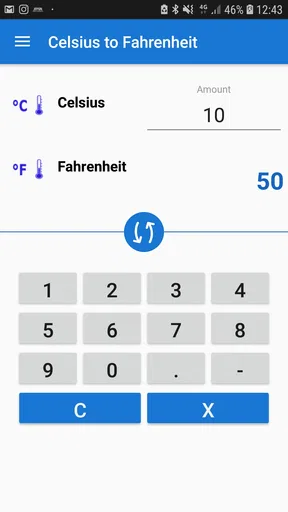
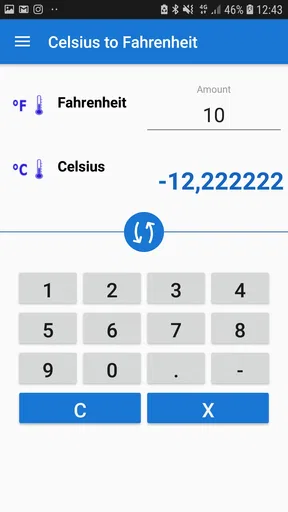
 Analysis by AppCompare
I usually keep a weather app on my phone for forecasts, alerts, and radar, but there are moments when I need something much simpler: a quick way to understand a temperature written in the other scale. Celsius to Fahrenheit Convert, developed by Webtoweb, is built around that narrow task. It is a free weather utility for converting temperatures between Celsius and Fahrenheit, rather than a full forecast service.
That limited purpose is both its appeal and its biggest question mark. During the first few days, the app feels pleasantly direct. I can open it, enter a value, read the conversion, and move on without sorting through maps, hourly forecasts, or advertising-heavy dashboards. However, after the novelty of trying a few familiar temperatures fades, the important issue becomes whether I regularly encounter a real need for it. My experience is that it earns a place for particular users and situations, but not automatically for everyone.
What using the converter feels like in everyday situations
When I use a temperature converter in daily life, the biggest help is avoiding a pause to calculate or search while I’m already making a decision. I’d keep the original figure in view, check which scale it uses, and convert before packing, cooking, or replying to someone abroad. That simple habit makes the next question clearer: when does a dedicated converter earn a place on my phone?
A useful first week for travelers and mixed-unit households
The strongest early use case is travel. If I normally think in Celsius and see a Fahrenheit forecast, a quick conversion removes the mental arithmetic from the decision. The same works in reverse when I am reading an American recipe, checking a message from someone abroad, or comparing weather information from a source that uses a different convention. A dedicated converter is more comfortable than pausing to remember a formula.
I also found it useful for conversations where both temperature systems appear naturally. Someone might describe a room, a swimming pool, an oven, or a cold morning using the scale they grew up with. Instead of asking for a second explanation, I can enter the number and get a practical reference point. The value is not that the calculation is difficult; it is that the app makes the answer immediate when my attention is elsewhere.
The store summary presents the central idea clearly: convert temperatures in Celsius and Fahrenheit. That focus matters. This is not pretending to replace a forecasting service, and I would not install it expecting current conditions, severe-weather notifications, climate charts, or local observations. It is a small tool for translation between two temperature scales.
Learning the relationship instead of calculating every time
One less obvious benefit is that repeated use can improve my own intuition. I can enter common values and begin to associate them with familiar sensations: a cool day, a warm room, or a very hot afternoon. The app works as a temporary bridge while I learn those relationships. After enough repetition, I may need it less often, which is a sign that it has done its job rather than a failure.
Worth Reading Before You Choose

EA SPORTS FC Mobile 26 Is a Bigger Football Game, but It Takes Time

Flipboard Shows What News Apps Must Do Beyond the Feed

Switching to Android Auto Means Rethinking Your Driving Routine

Google Calendar Makes a Crowded Week Easier to Manage

Ludo King Makes the Most of the Minutes Between Plans

Baby Panda World Brings Quick Play to Modern Phones, but Its Game Library Feels Busy
For students, the utility can also serve as a quick check while studying temperature conversion. I would use it to verify mental work, not as a substitute for understanding the formula. Entering a result first can hide a mistake without explaining why it happened, so the best workflow is to calculate independently and then compare. That makes the app more useful as a checking tool than as a complete lesson.
A practical tip is to use familiar anchor points rather than random values. Checking the temperatures you actually encounter in forecasts, cooking instructions, or travel plans builds recognition faster than repeatedly entering arbitrary numbers. This is one reason the app can feel more valuable during a focused week than during casual testing.
What the app does not try to be
Because it sits in the weather category, some people may expect a broader weather experience. I would set that expectation aside before downloading it. A weather forecast app answers questions such as whether it will rain, how conditions will change, or what to wear. This converter answers a different question: what does this temperature mean in the scale I use?
That distinction makes it easy to recommend to a traveler, international student, multilingual family, or anyone who frequently reads foreign weather and cooking material. It is much harder to recommend as a general-purpose weather app. If I want one application to cover forecasts and conversions, I would choose a forecast service that already includes unit settings. Installing a second app makes sense only when the conversion task appears often enough to justify the extra icon.
How it compares with the usual alternatives
The most obvious alternative is a web search. Typing a question into a search engine can produce a conversion, but it requires a connection, a search step, and enough attention to phrase the request correctly. A dedicated utility is quicker when I already know the number and only need the answer. It also avoids mixing the result with unrelated search pages.
Another alternative is mental arithmetic. The familiar formula is useful, but it is easy to make a sign or multiplication mistake when converting an unusual value. I would trust my own estimate for a rough conversation, yet use the app when precision matters in a recipe, a classroom exercise, or a written plan. The trade-off is that mental conversion is always available, while the app requires me to open it.
Many full weather apps let users switch the display between Celsius and Fahrenheit in settings. That is better when I want forecasts in my preferred unit all the time. Celsius to Fahrenheit Convert is more suitable when I am dealing with an isolated value from another source and do not want to configure an entire weather service.
Who benefits most from keeping it installed
I see the best fit in people who regularly cross between measurement systems. A traveler checking local forecasts, a student working through science exercises, a cook following international recipes, or a family communicating across countries can all get recurring value from this focused tool. It is also approachable for users who do not want a complicated interface or a large collection of weather features.
The Everyone content rating makes it suitable for a broad audience, and the minimum operating-system requirement is Android 7.0. That makes it accessible on many older Android phones, although the practical experience will still depend on the device. The app is free to install, while in-app purchases are listed at $2.99 per item. I would consider that cost only after deciding that the converter has become part of my routine rather than treating it as an impulse download.
When the first-week appeal starts to fade
The main source of fatigue is repetition. Temperature conversion is a narrow action, so there is not much to explore once I understand the basic workflow. A full weather app can bring me back with changing forecasts, alerts, and location-based information. This utility depends on me encountering a temperature in the wrong scale. If that happens only once every few months, the app may become forgotten between uses.
There is also a small friction in maintaining a separate tool for something that some phones, search engines, calculators, and weather services can already handle. The app needs to be faster or clearer than those alternatives to justify its permanent space. For occasional conversion, a browser or built-in calculator may be enough. For frequent conversion, the dedicated approach becomes more convincing.
Another trade-off is specialization. The focused design keeps the task understandable, but it also means I should not expect the broader context that helps me interpret weather. A converted number tells me the equivalent temperature; it does not tell me how that compares with yesterday, whether the wind will make it feel colder, or whether conditions are changing. I still need another source for those decisions.
Month-to-month value depends on a repeatable habit
After the first month, I would judge the app by frequency rather than by how pleasant the first few conversions felt. The most sustainable habit is to open it at a predictable point in an existing routine: checking an overseas forecast, reviewing a recipe, preparing travel notes, or helping with homework. When the app is tied to one of those recurring actions, it remains useful without demanding much maintenance.
A good workflow is to keep the original value visible while converting it, especially when copying information into a message or itinerary. That reduces the chance of mixing up the direction of the conversion. I would also avoid relying on a rough mental shortcut when the exact figure matters. The app is most valuable as a quick, dependable checkpoint, not as a place to browse.
For a household, its recurring value can be higher than for one person. If different family members use different temperature systems, a shared conversion habit prevents repeated explanations. The app can become a neutral reference during planning rather than forcing one person to adapt every time. That is a modest benefit, but it is more durable than simply experimenting with the interface during the first day.
The current version is 1.4.3, and the product has been available since Apr 20, 2018. I read that history as evidence that this is an established small utility rather than a brand-new experiment. Still, a long-running converter does not automatically become essential. Its lasting value comes from the problem it solves for me, not from how long it has existed.
Maintenance is light, but attention still matters
A converter has a naturally low maintenance burden because the underlying task does not change with the season. I do not need to configure locations, follow forecast providers, or build a collection of saved places simply to convert a number. That simplicity is a real advantage for anyone who wants a tool that stays out of the way.
At the same time, I would periodically check that the installed version remains current and that the app still fits my workflow. The developer is Webtoweb, and the app has an average rating of 4.2 from around three thousand ratings, with roughly five hundred sixty written reviews. Those figures suggest a generally positive reception, but they are not a replacement for testing whether the interface suits me.
The app has passed one hundred thousand installs, which gives it a meaningful user base for such a focused tool. I would still keep my expectations proportional: popularity can indicate that the use case is real, but it cannot turn a one-purpose converter into a full weather platform. The maintenance advantage is precisely its small scope.
The listed purchase model is another part of long-term consideration. Since the app is free, I can evaluate the everyday workflow before spending anything. If an optional purchase removes an annoyance or supports continued use, it may be reasonable for a frequent user. If I only convert a temperature occasionally, paying for extras would be difficult to justify when free alternatives are already available.
Specific ways I would use it over time
For travel, I would use the converter while preparing a packing list. Rather than memorizing a foreign forecast, I could translate the expected temperatures into the scale I understand and then make a clothing decision. The useful insight here is that the conversion belongs beside the planning task, not in isolation; the number matters because it changes what I pack.
For cooking, I would treat it as a verification step before turning on the oven or preparing a temperature-sensitive recipe. I would copy the original value carefully, confirm which scale the recipe uses, and then compare the converted result with the settings available on my appliance. The app can reduce a unit mismatch, but it cannot resolve differences between recipe instructions and a particular oven.
For study, I would use it after attempting the formula myself. Entering both directions can help reveal whether I accidentally treated Celsius as Fahrenheit or reversed the operation. This makes the app more useful for checking a process than simply producing an answer. It also prevents the habit of pressing buttons without learning the relationship between the scales.
For family communication, I would use it when someone sends a temperature without context. A quick conversion lets me respond naturally instead of asking the other person to translate it. That small reduction in friction is probably the most lasting benefit for people who regularly communicate internationally.
Who should skip it
I would skip this app if I already use a weather service that displays both units or lets me switch between them instantly. I would also skip it if I rarely encounter foreign temperature values. In those cases, a separate icon adds clutter without solving a recurring problem.
It is not the right choice for someone looking for forecasts, radar, alerts, air-quality information, historical weather, or detailed climate context. The category label may create that expectation, but the app's practical role is much narrower. Choosing it for those broader needs would lead to disappointment, even if the conversion itself works well.
I would also think twice if I need a teaching-oriented calculator with explanations, formulas, or a history of work. A focused converter may be faster for a final result, but a dedicated educational tool or ordinary calculator could be better for showing each step. The right choice depends on whether I value speed or instruction.
My long-term verdict
After the initial curiosity wears off, Celsius to Fahrenheit Convert remains worthwhile only when temperature-unit confusion is a recurring part of my life. That is a narrower audience than the weather category might suggest, but for that audience the focus is sensible. I appreciate not having to navigate a forecast dashboard when all I need is an equivalent value.
Its lasting strengths are quick reference, low maintenance, broad accessibility, and a clear purpose. Its lasting weakness is that the purpose is so limited. The app cannot create its own daily relevance in the way a forecast service can, so I would not keep it installed out of habit alone. I would keep it because international travel, recipes, schoolwork, or family conversations repeatedly give me a reason to open it.
My recommendation is straightforward: try the free version if you frequently move between Celsius and Fahrenheit, and judge it after a normal month rather than after a few novelty conversions. If it saves me repeated searches or prevents mistakes, it has earned its small space. If I keep forgetting it exists, my phone's calculator, browser, or existing weather app is probably the better long-term solution.
In my experience, this is a practical specialist rather than a complete weather companion. Its real value is recurring convenience, not feature depth. For the right user, that can be enough; for everyone else, the narrow focus will likely make the app fade into the background once the first-week appeal is gone.
Pros
- Converts Celsius to Fahrenheit quickly with minimal input.
- Simple interface that is easy for beginners to understand.
- Useful for cooking
- travel
- weather
- and school calculations.
- Lightweight app that should run smoothly on most devices.
- Provides convenient temperature conversion without manual formulas.
Cons
- May offer limited value if your phone already includes a converter.
- Accuracy depends on entering the temperature correctly.
- Could feel too basic for users needing multiple unit conversions.
- May include ads or require permissions depending on the version.
- Results may not suit users who need advanced scientific precision.
FAQs for Celsius to Fahrenheit Convert
What does Celsius to Fahrenheit Convert do?
Celsius to Fahrenheit Convert is a simple temperature conversion tool designed to change values from degrees Celsius to degrees Fahrenheit. After entering a temperature, the app calculates the equivalent result using the standard conversion formula: Fahrenheit equals Celsius multiplied by 9/5, plus 32. It can be useful for cooking, weather comparisons, schoolwork, travel, science, and everyday temperature checks.
How do I convert a temperature with the app?
Using Celsius to Fahrenheit Convert is generally straightforward. Enter the Celsius value in the available input field, then tap the conversion button or use the provided calculator interface. The Fahrenheit result should appear immediately, making it convenient for quick calculations. Negative temperatures and decimal values are also important to test when comparing winter weather, laboratory measurements, or precise cooking temperatures.
Does Celsius to Fahrenheit Convert work without an internet connection?
A basic Celsius-to-Fahrenheit calculator normally performs all calculations directly on the device, so an internet connection should not be necessary for its main function. This makes the app practical while traveling, in classrooms, or in places with limited connectivity. However, availability of advertisements, updates, privacy information, or links to other features may still depend on the app version and device settings.
Is Celsius to Fahrenheit Convert accurate for everyday use?
The conversion should be accurate as long as the app uses the standard mathematical formula and displays enough decimal places for the requested result. For ordinary weather, cooking, travel, and educational purposes, the output is usually more than sufficient. Users working with professional scientific or industrial measurements should still verify rounding settings and compare results with approved equipment or specialized software.
Is Celsius to Fahrenheit Convert free and safe to download?
The app may be available as a free download, although the exact pricing, advertising, permissions, and optional purchases can vary by platform and version. Before installing, check its official Google Play or App Store listing, developer information, recent reviews, privacy policy, and requested permissions. Avoid unofficial download sources, and make sure the application does not request access unrelated to a temperature converter.


